CrowDraw docs · Edit
Text
Text in CrowDraw lives on its own layer and stays editable: change the words, font or size at any time, then rasterise it when you want to paint on it.
Adding text
Choose Add text in Actions › Add, or in the quick menu. CrowDraw adds a text layer above the current one with the word "Text" selected, in bold, in your current colour. Type to replace it.
- Drag the move handle on the text box to place it.
- Drag the handle on its side to change how wide the box is; the text wraps to fit.
- Pick another colour while editing and the text changes with it.
Fonts and style
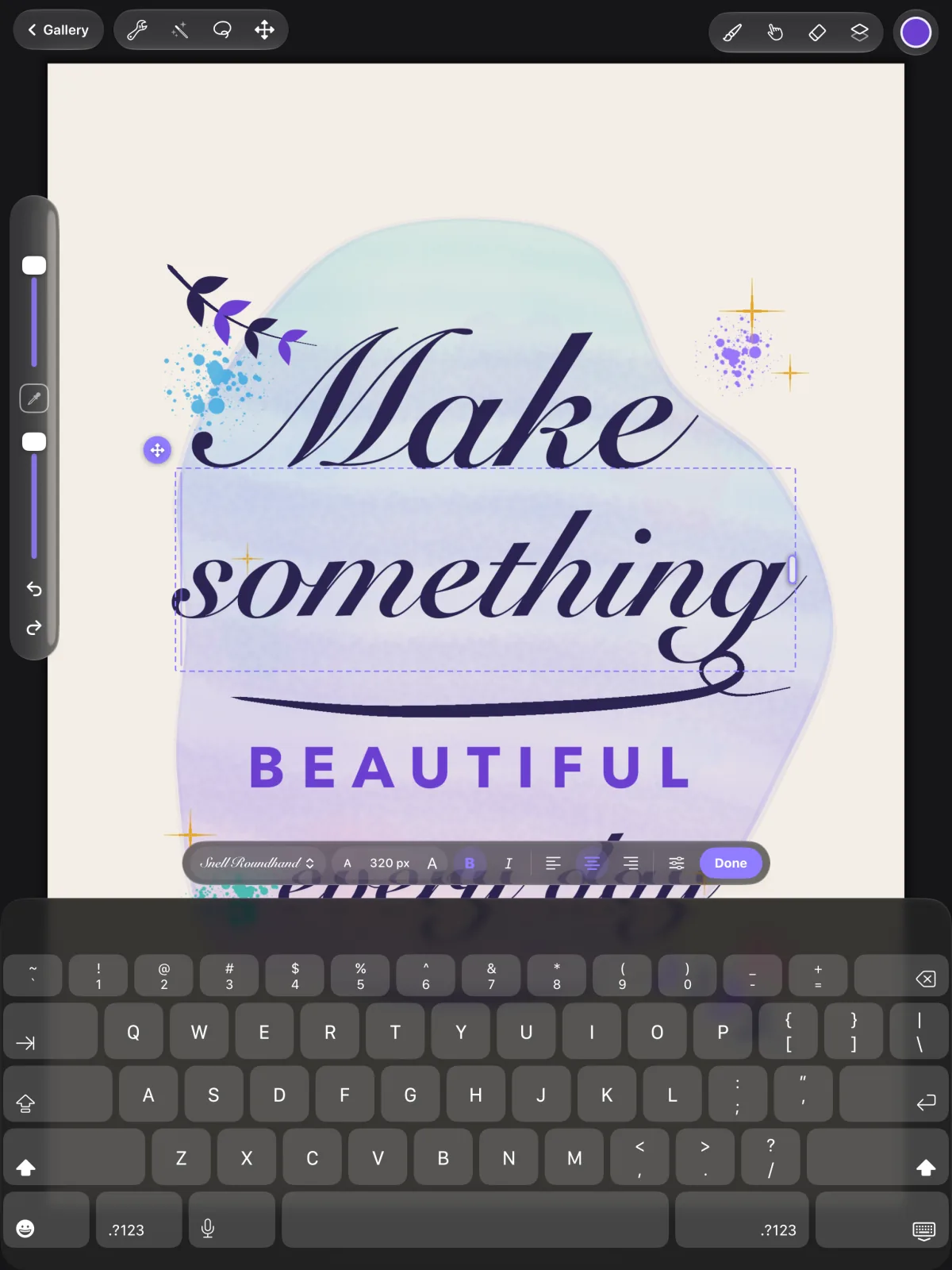
While you edit, the bar at the bottom has:
| Control | What it does |
|---|---|
| Font | System, Rounded, Serif or Monospaced, a list of font families, or More fonts… for any font installed on your iPad. |
| Size | Step the size up or down. |
| Bold, Italic | Style the whole text. |
| Alignment | Left, centre or right. |
| Spacing | Size (4 to 2000 px), Tracking (space between letters) and Line height, with Reset spacing. |
| Done | Finish editing. |
- FontSystem, Rounded, Serif or Monospaced, a list of font families, or More fonts… for any font installed on your iPad.
- SizeStep the size up or down.
- Bold, ItalicStyle the whole text.
- AlignmentLeft, centre or right.
- SpacingSize (4 to 2000 px), Tracking (space between letters) and Line height, with Reset spacing.
- DoneFinish editing.
The whole editing session, from adding or opening the text to tapping Done, is one undo step.
Editing text later
With the text tool active, tap a text layer on the canvas to edit it. Or open the layer's options in the Layers panel and choose Edit text. If you remove all the words from a new text box, it disappears when you finish.
Rasterising
A text layer is redrawn from its words whenever you change them, so it can't be painted on, filled, adjusted or selected inside. You can still move, rotate and scale it evenly with Transform, and it stays editable. Choose Rasterise in its layer options to turn it into an ordinary paint layer, for painting on it, distorting, warping or flipping it. It looks exactly the same, but the words are no longer editable.
For AI tools: this page as Markdown, the page index and all pages in one file.
